Architecture Overview
Note
🔧 Intermediate / Architecture — Understand how pyArchimate is organized and where to hook in your own custom readers, writers, and validators.
Package Structure
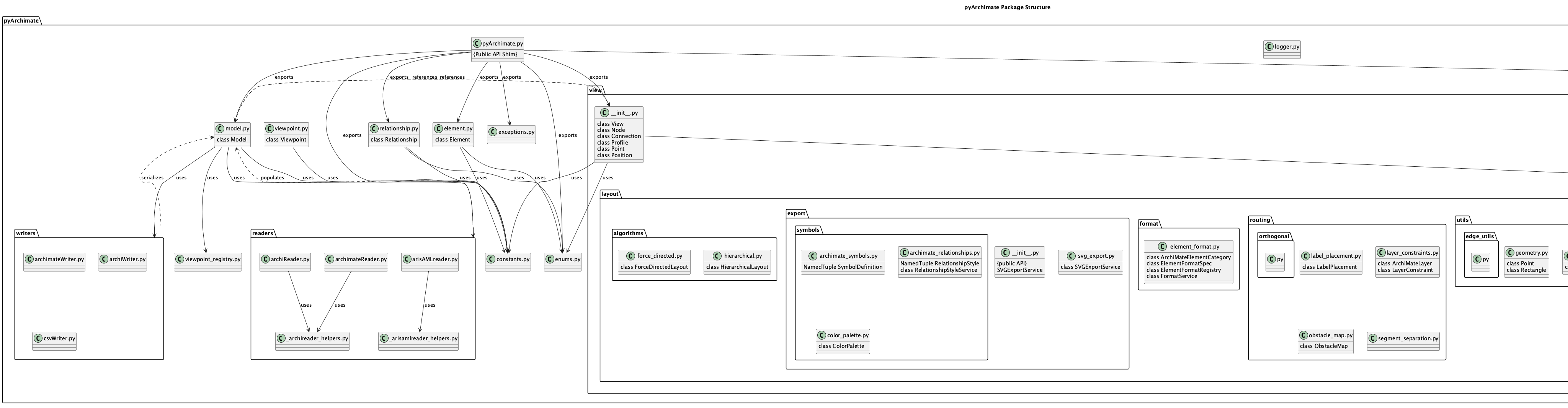
PyArchimate is organized into functional packages, each with a specific responsibility:
pyArchimateMain package. Provides the public API through the shim module
pyArchimate.pyArchimate, which re-exports all commonly-used classes and enums.pyArchimate.modelCore data structures. Contains
Model,Element,Relationship,View,Node, andConnectionclasses that form the in-memory representation of an ArchiMate model.pyArchimate.element/pyArchimate.relationshipType definitions.
ArchiTypeandRelationTypeenums define all supported element and relationship types per the ArchiMate specification.pyArchimate.readersImport implementations. Contains reader classes for different file formats:
archimateReader— Native ArchiMate XML format (.archimate)openGroupReader— OpenGroup XML exchange formatCustom readers can be registered for new formats
pyArchimate.writersExport implementations. Contains writer classes for different output formats:
archiWriter— Write to native ArchiMate XML formatarchimateWriter— Alternative ArchiMate XML writerCustom writers can be registered for new formats
pyArchimate.validationModel validation. Contains rules and validators for checking model consistency:
check_valid_relationship— Validate that a relationship type is allowed between two element typeschecker_rules.yml— Configuration file defining what element types are valid in which layers and viewpoints
pyArchimate.viewpointViewpoint definitions. Contains standard ArchiMate viewpoint definitions (Business Process, Application Structure, Technology, etc.) and utilities for filtering elements by viewpoint.
pyArchimate.helpersUtility functions. Shared utilities for working with models, elements, and relationships (hierarchy operations, property management, etc.).
Layered Dependencies
The architecture follows a layered dependency model:
Core Layer:
model,element,relationship— fundamental data structures with no external dependencies beyond lxml for XML handling.Validation Layer:
validation— builds on core layer to enforce business rules and type constraints.Transformation Layer:
readers,writers— builds on core layer to parse and generate file formats.Public API Layer:
pyArchimate(shim) — re-exports commonly-used classes and enums for convenience.
Each layer is independent, allowing you to:
Use the core model in your own custom tools
Replace the validation layer with custom rules
Add new readers and writers without modifying existing code
Architecture Diagrams
The following diagrams illustrate pyArchimate’s architecture from different perspectives:
The files in docs/diagrams are PlantUML sources that document the architecture of
pyArchimate. They include both classic UML views (class, component, object, deployment, etc.)
and derived C4-style diagrams that illustrate how the project is composed.
Available diagrams:
The rendered PNG artifacts live next to the PlantUML sources (docs/diagrams/*.png) and are overwritten each time you run scripts/render_diagrams.sh. Including them in the docs allows the website to display the diagrams without requiring a PlantUML renderer on the client side.
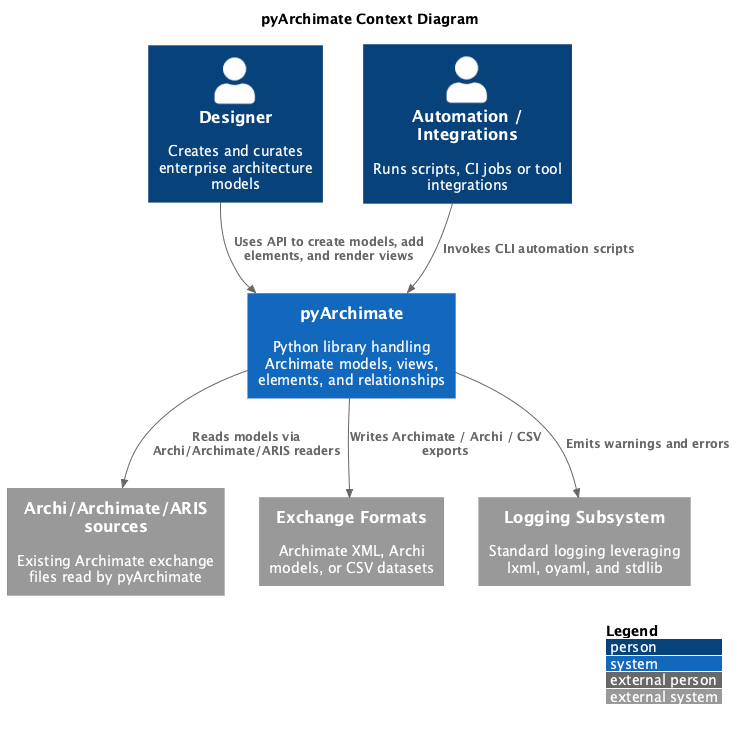
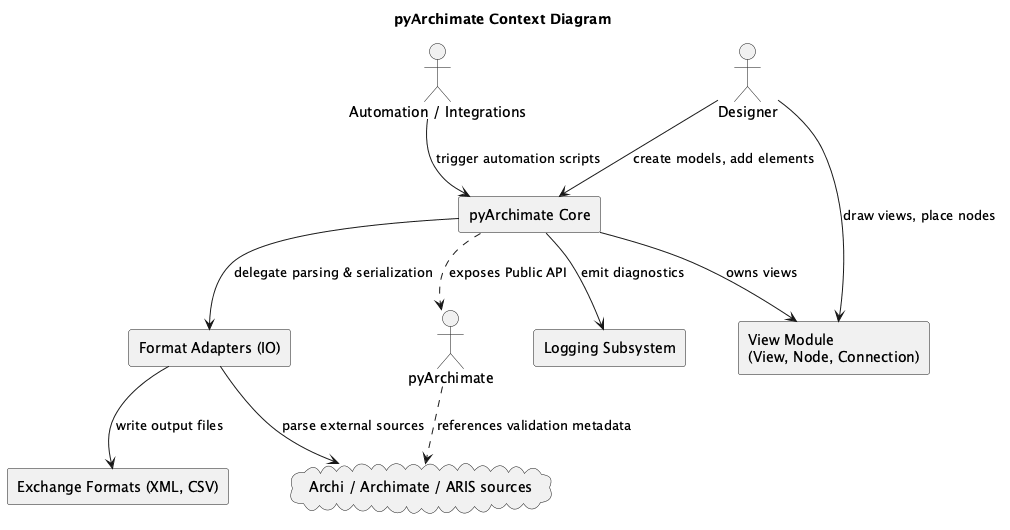
context.puml/c4_context.pumlContext diagram showing how pyArchimate integrates with external tooling, developers, and the ArchiMate standard.
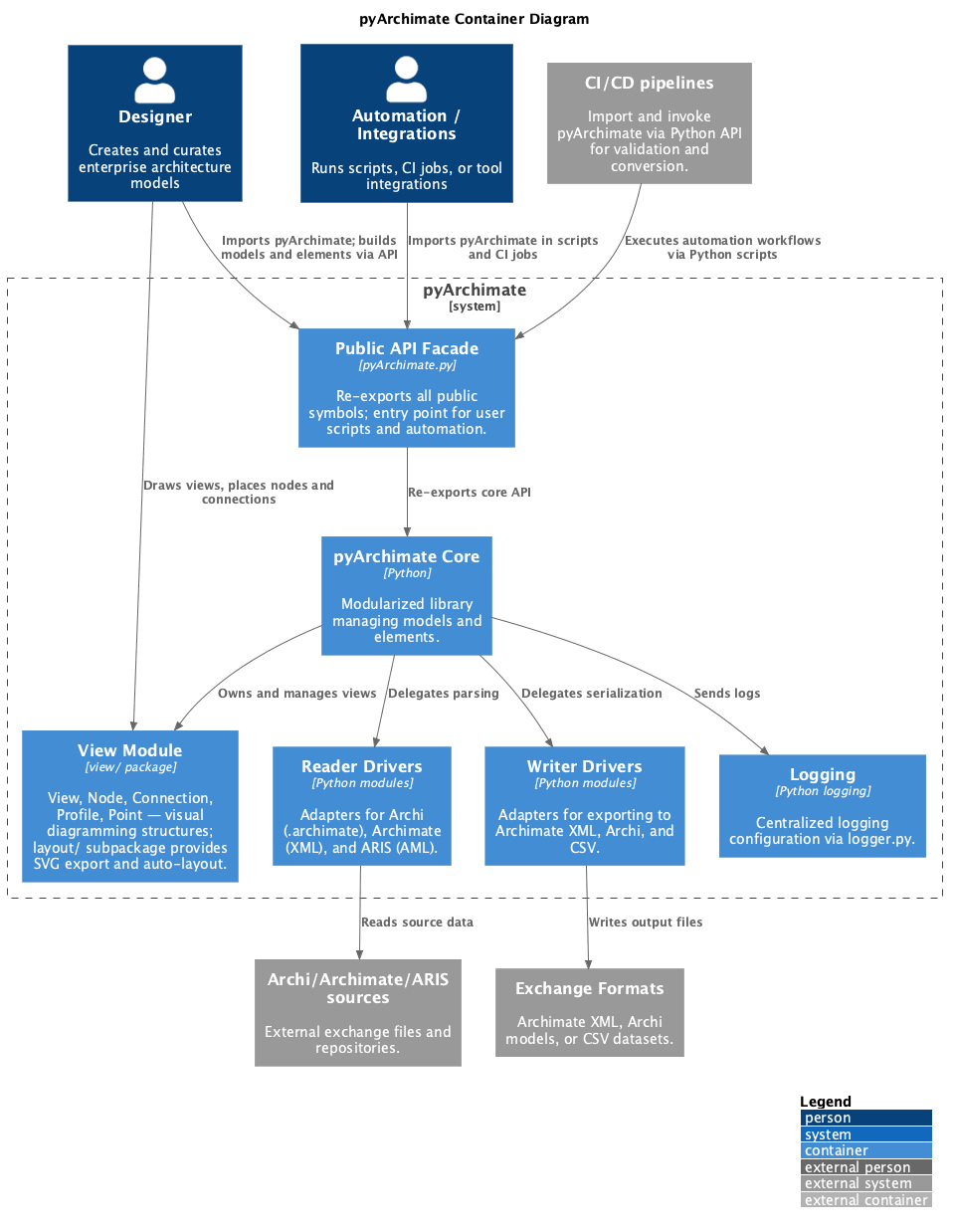
package.puml/c4_container.pumlContainer diagram showing how pyArchimate integrates with external tooling, developers, and the ArchiMate standard.
component.puml/c4_component.pumlComponent diagrams that highlight the major modules such as the model core, readers, and writers.
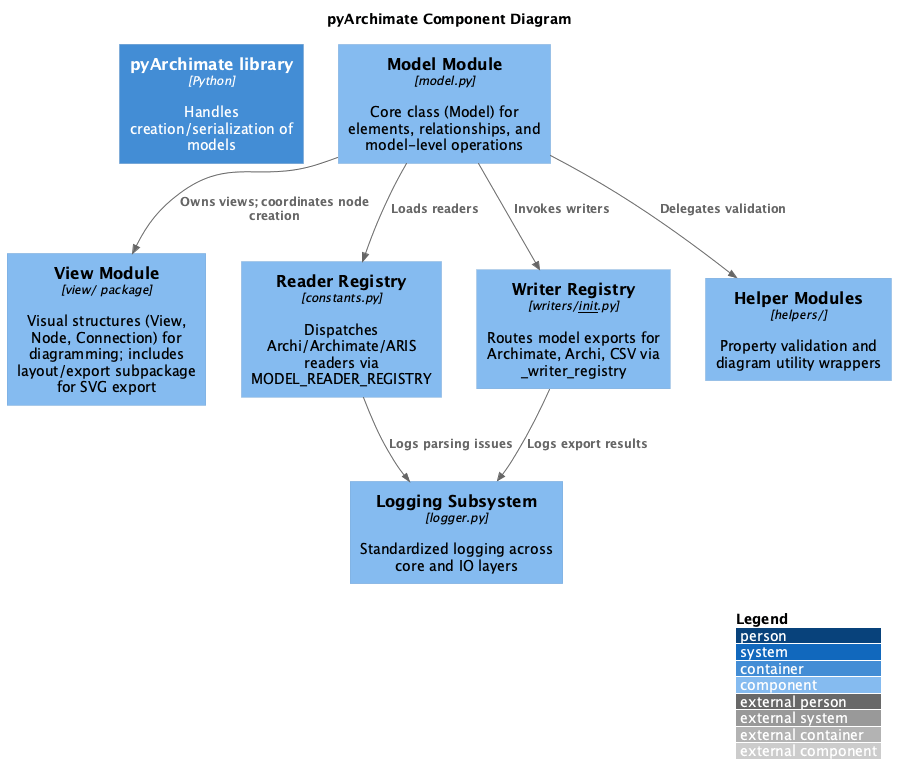
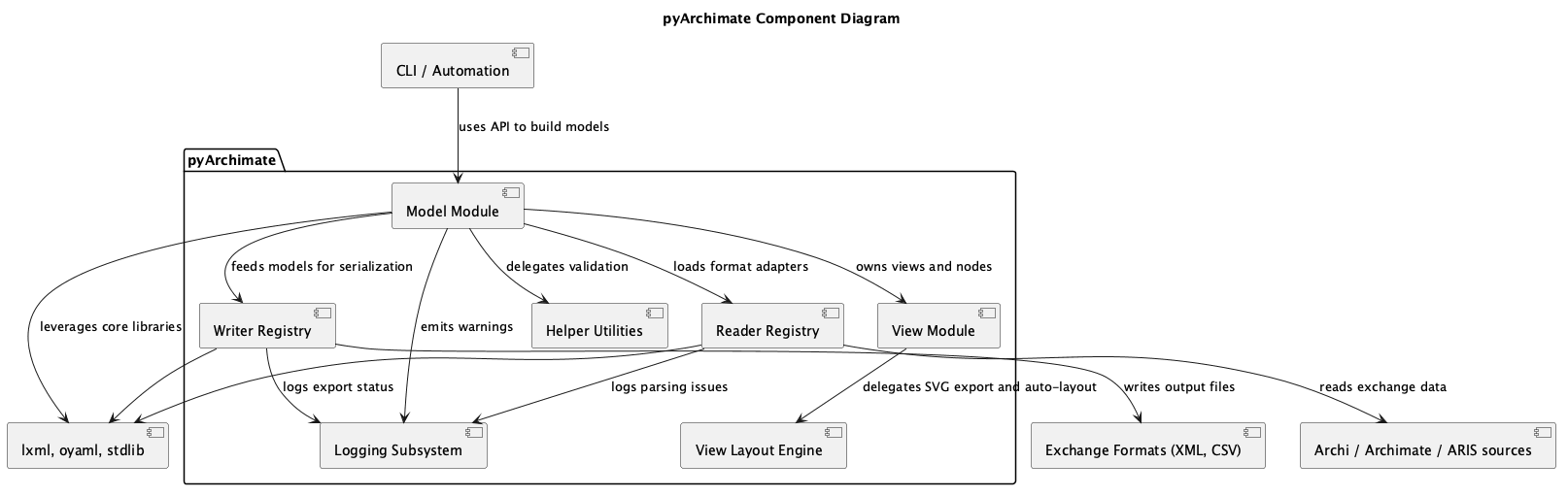
deployment.puml/c4_deployment.pumlDeployment diagrams describing the runtime environment, processing steps, and how the PlantUML renderer/slim server might be hosted.
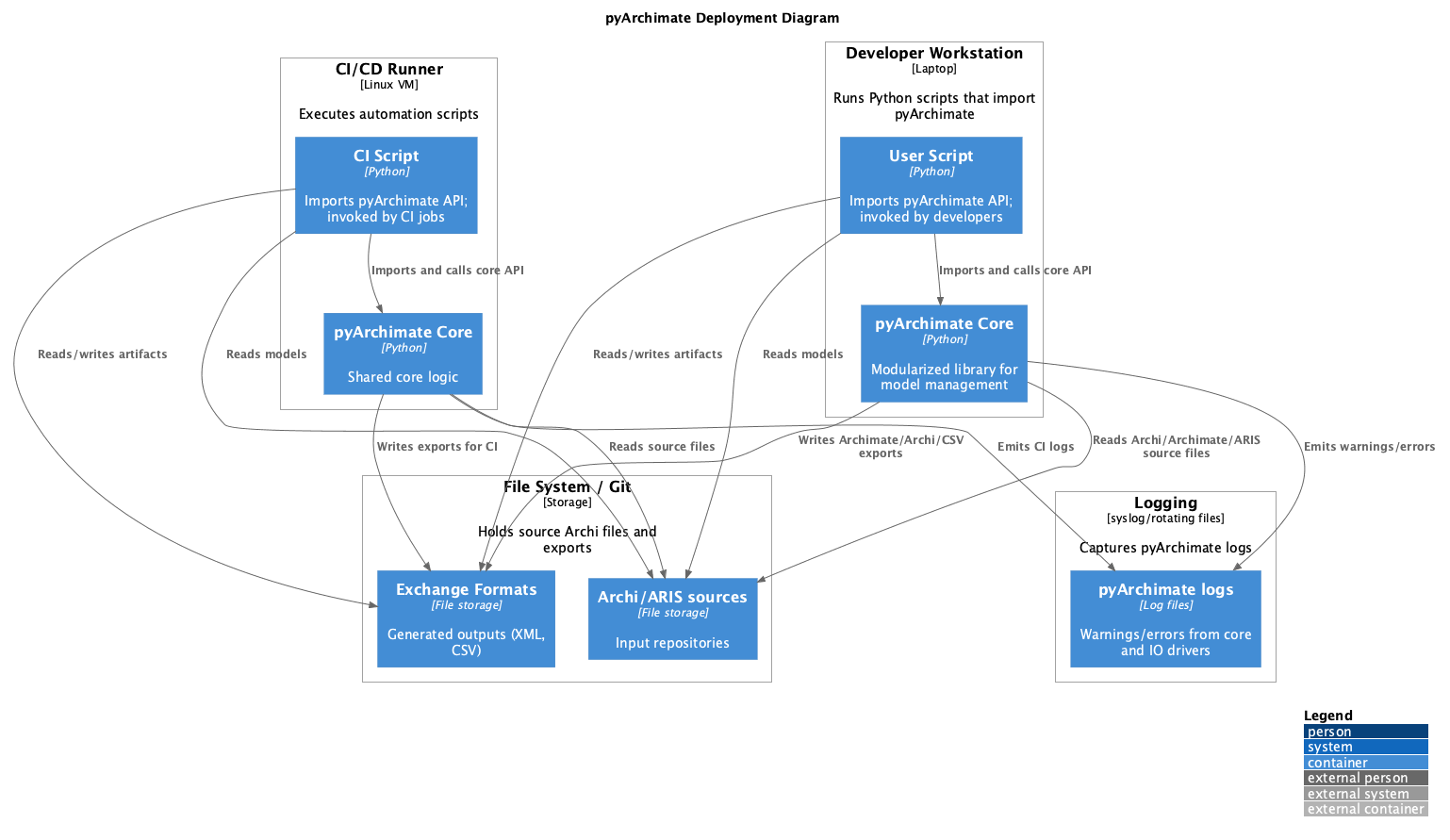
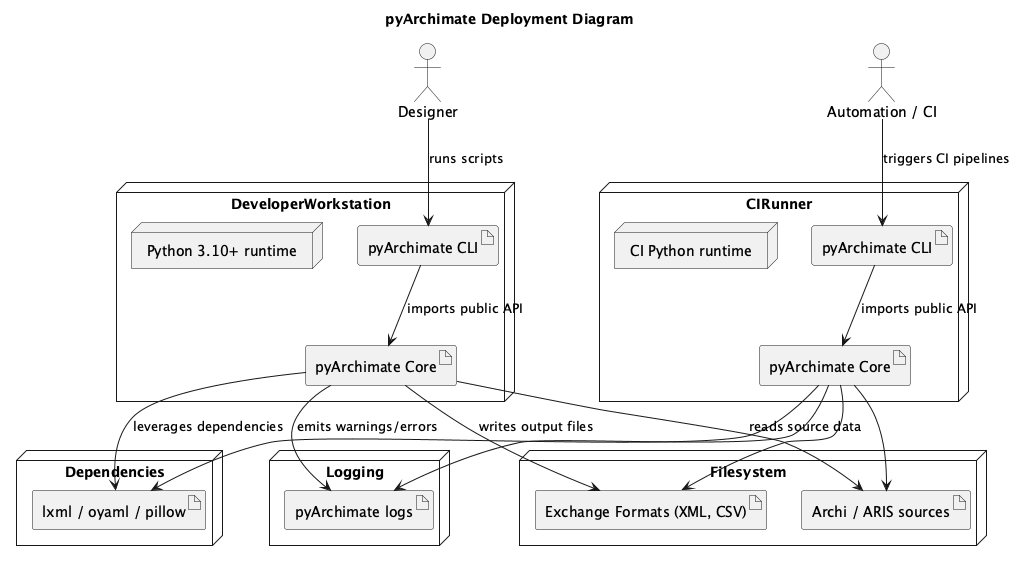
class.puml/object.puml/composite.pumlUML views that sketch the static structure of Model, Element, Relationship, and the associated helper utilities.
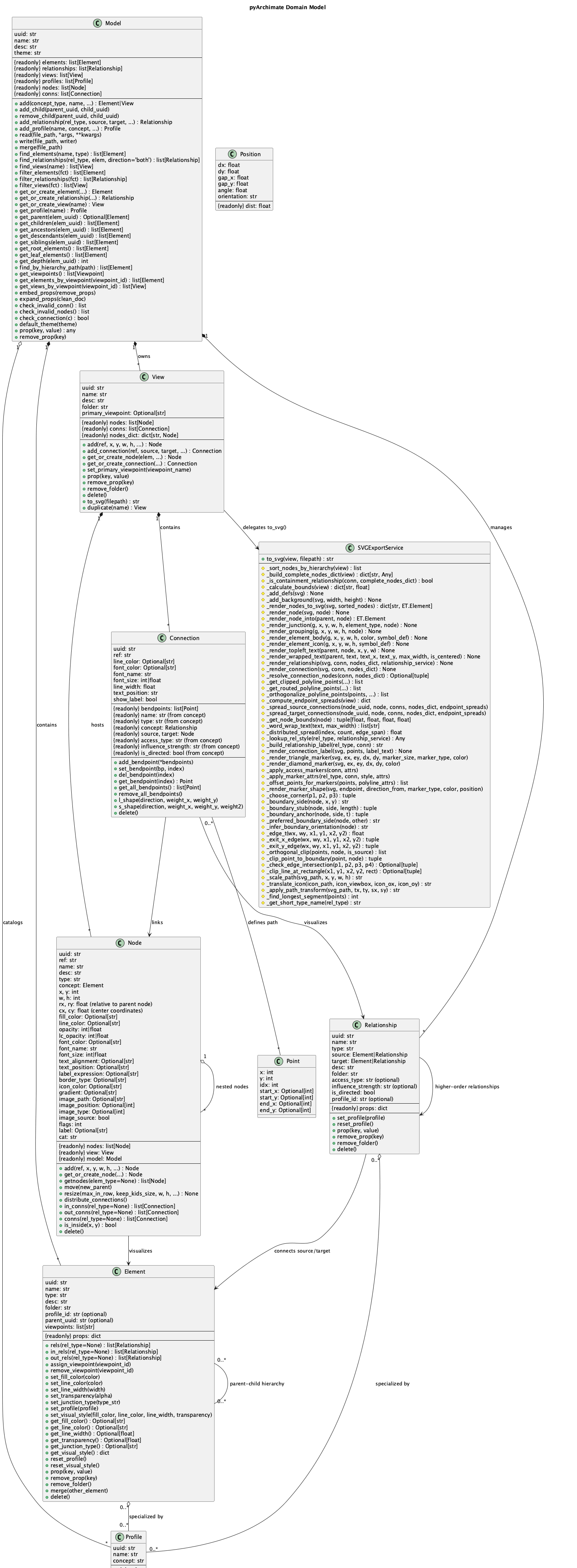
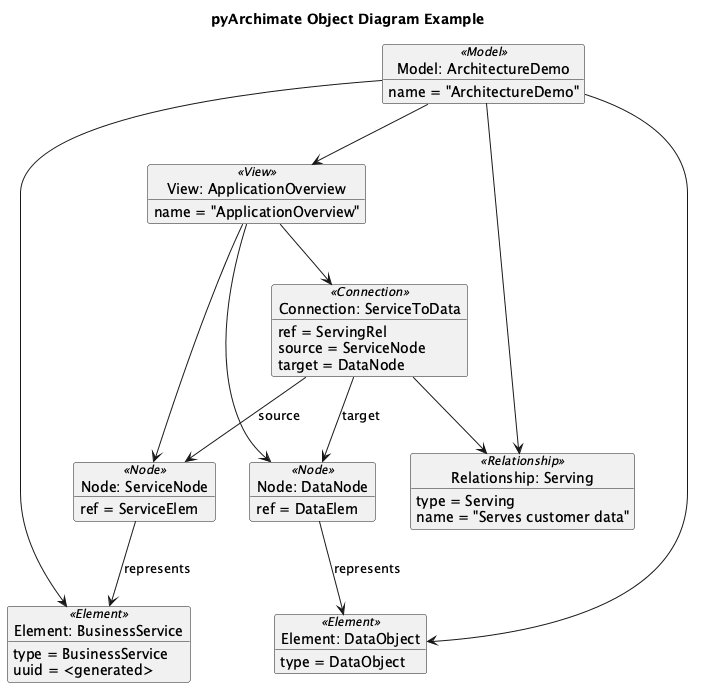
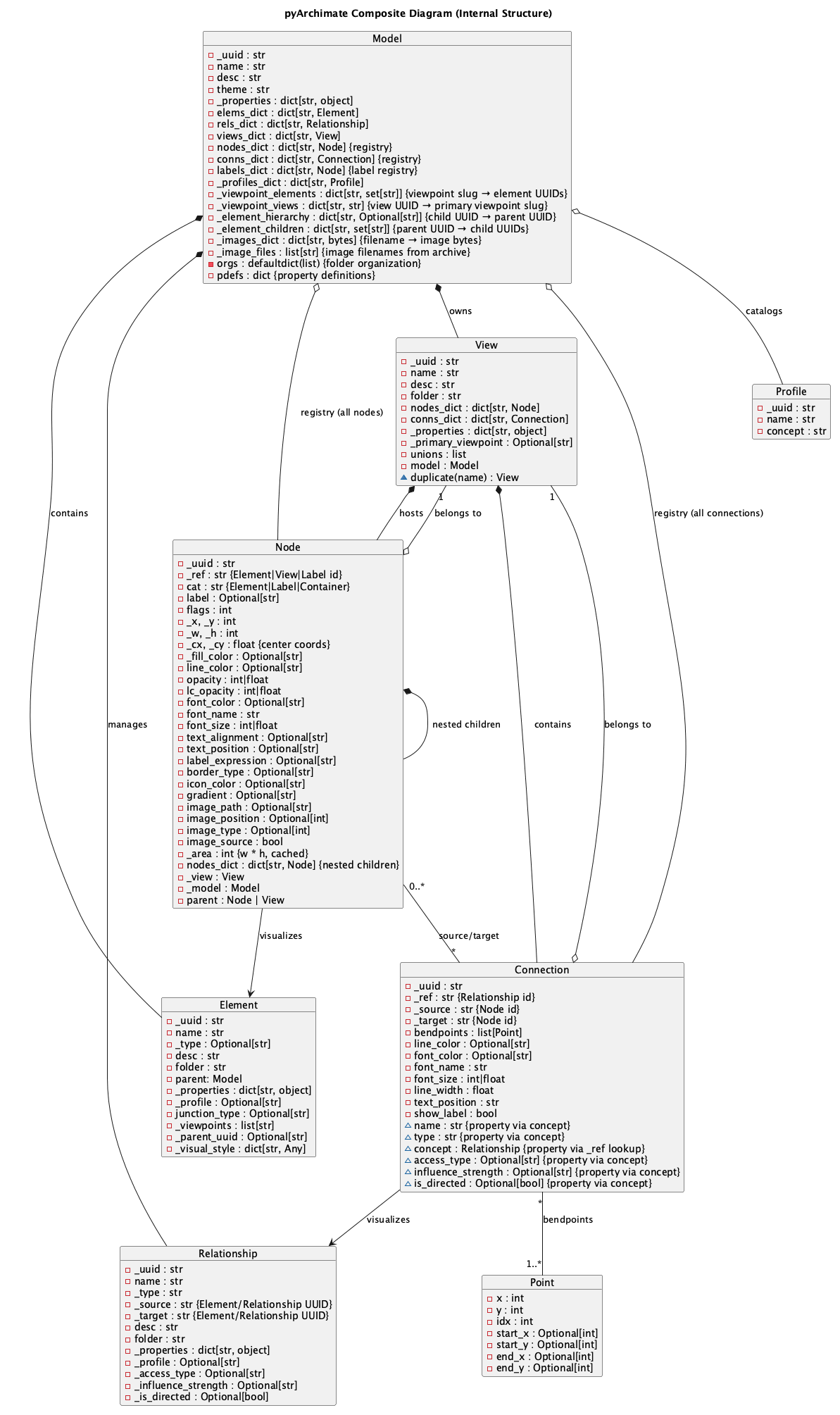
state.pumlState diagram illustrating the Model lifecycle as it moves from empty through populated, view ready, serialized, and invalid states when validations fail.
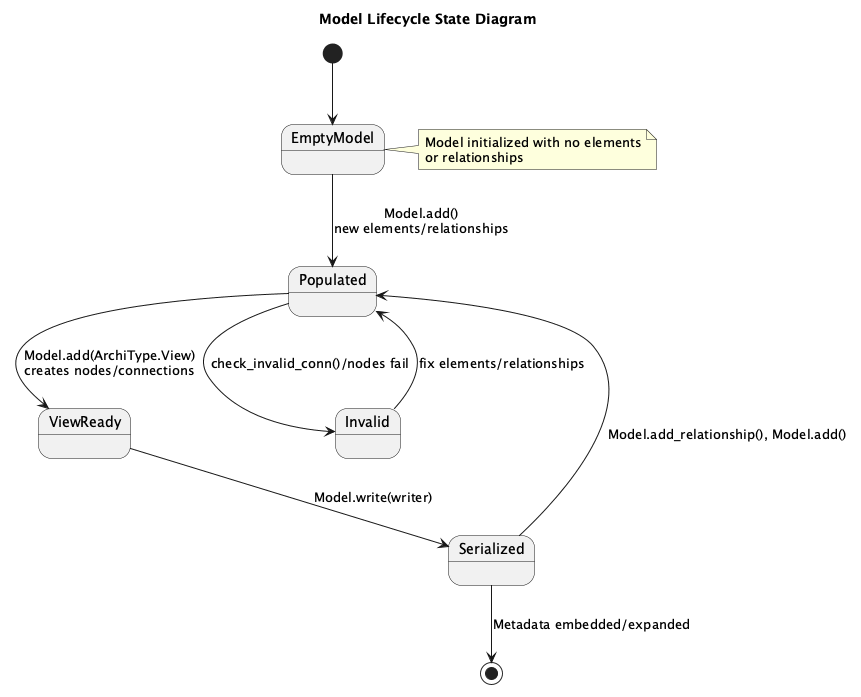
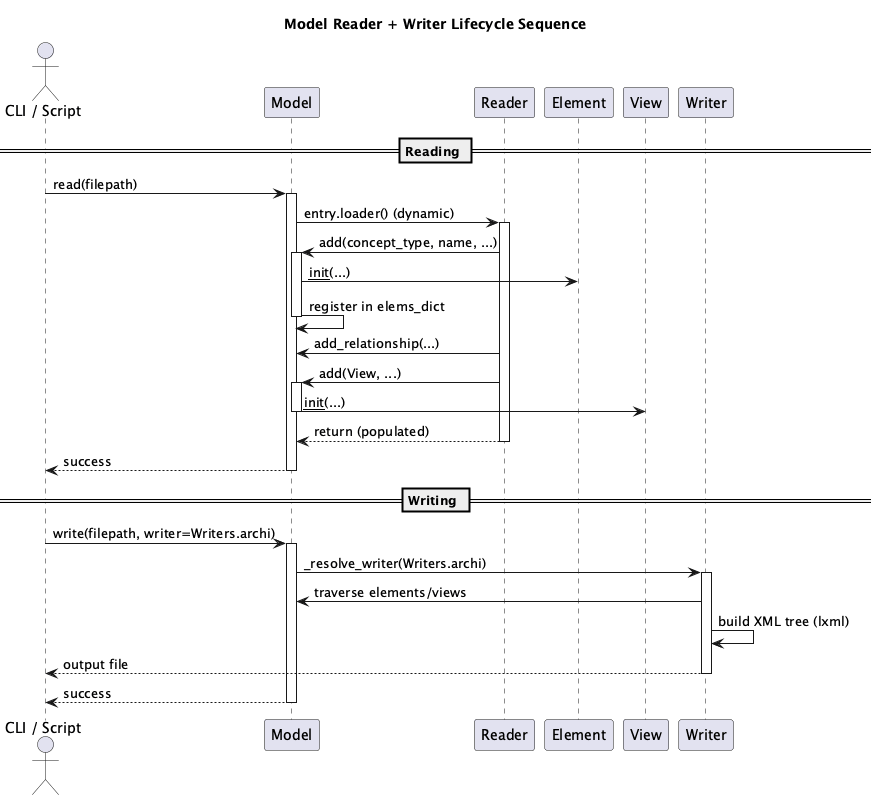
sequence.pumlSequence diagram depicting how the CLI/script invokes Model.read, how readers populate Elements/Relationships, and how writers serialize the resulting model.
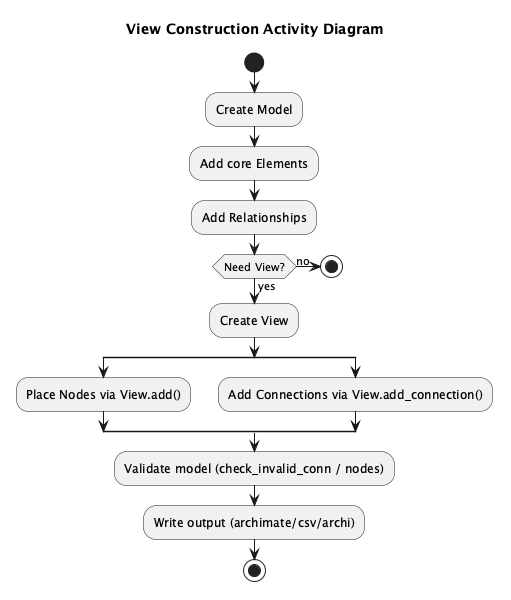
activity.pumlActivity diagram of view construction: creating models, adding elements/relationships, building views, and writing outputs.
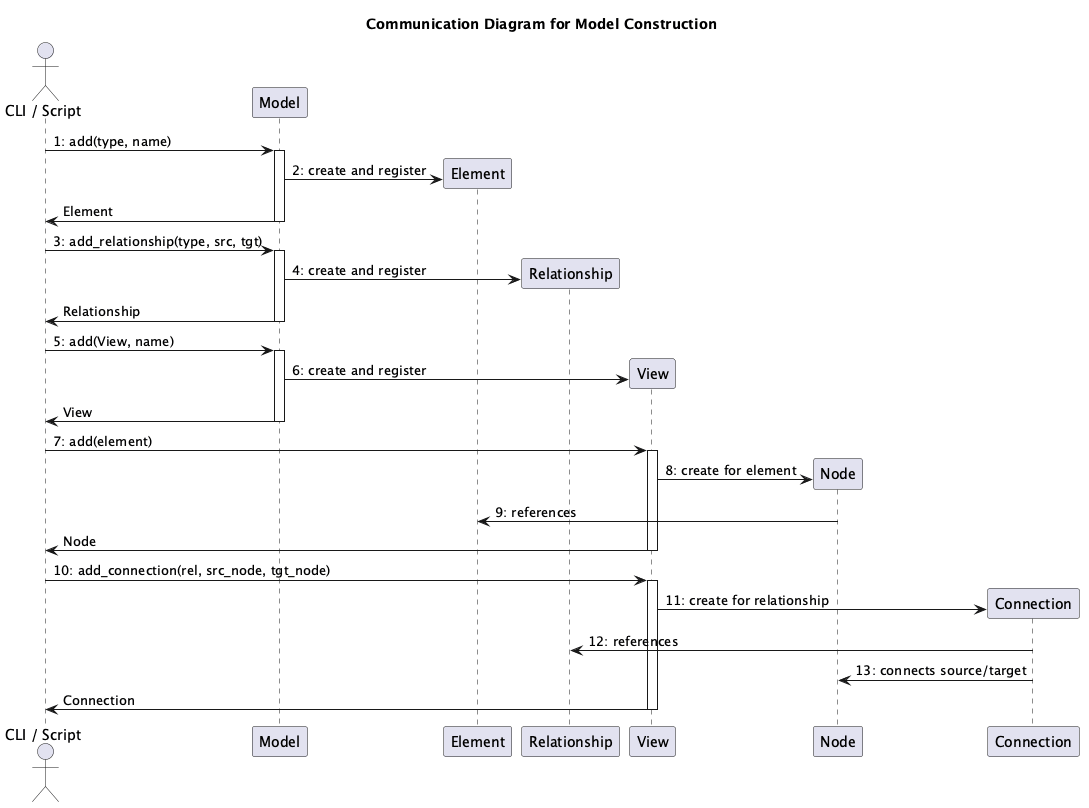
communication.pumlCommunication diagram showing runtime message paths between Model, Element, Relationship, View, Node, and Connection during CRUD operations.
Rendering Diagrams
To regenerate the PNG artifacts locate the PlantUML renderer and run the helper script:
`
./scripts/render_diagrams.sh
`
The script encodes every PlantUML source, hits ${PLANTUML_SERVER:-https://www.plantuml.com/plantuml}, follows redirects, and retries slow transfers so the loop can finish. Set PLANTUML_SERVER if you want to target a different host (for example export PLANTUML_SERVER=http://host.containers.internal:8080), otherwise it defaults to the public PlantUML service.
If you add or refactor diagrams, update this document with a short explanation of the new view and add the source file to the script so it continues to be rendered automatically.
Extension Points
PyArchimate is designed to be extended. The following sections explain where and how to add custom functionality.
Custom Readers
To add support for a new import format, create a reader class and register it in the MODEL_READER_REGISTRY:
from pyArchimate.readers import MODEL_READER_REGISTRY

class CustomReader:
    def read(self, filepath):
        # Parse file and return a Model instance
        pass

MODEL_READER_REGISTRY['custom'] = CustomReader()
For detailed examples and patterns, see Extending pyArchimate.
Custom Writers
To add support for a new export format, extend the Writers enum and implement a writer class:
from pyArchimate.writers import Writers

class CustomWriter:
    def write(self, model, filepath):
        # Serialize model to file
        pass
For detailed examples and patterns, see Extending pyArchimate.
Custom Validation Rules
You can extend model validation by adding custom rules to checker_rules.yml or by programmatically validating models using the public API.
For details, see Extending pyArchimate.